
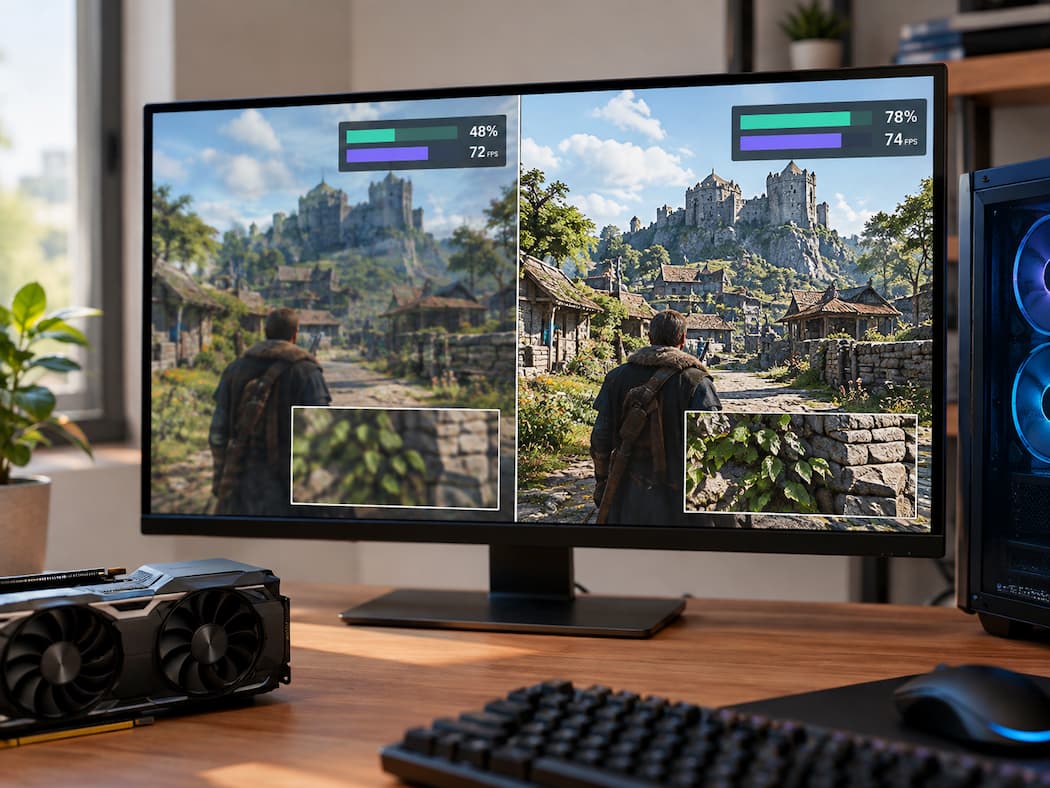
You can raise a game’s texture quality, watch VRAM usage climb noticeably, and then look at the FPS counter and see almost no difference. At first, that seems strange. If the computer is using much more graphics memory, shouldn’t the game be doing much more work?
Not necessarily.
Texture quality and frame rate are connected, but they do not measure the same part of the rendering process. A texture setting can change how much data the graphics card needs to keep available without adding a similar amount of work to the GPU’s rendering hardware. That is why a game can use considerably more VRAM at a higher texture setting while maintaining a similar average frame rate. The situation changes when the available VRAM becomes a limiting resource. At that point, texture quality can contribute to stuttering, texture streaming problems, or less consistent frame delivery. Understanding that difference makes texture settings much easier to interpret.
Texture Quality Changes the Detail Stored in Game Assets
Textures are image data used to give surfaces their visible appearance. A wall might have a texture containing brick patterns. A character’s clothing can use textures for fabric detail. A weapon can have separate texture data describing its surface appearance. Roads, floors, signs, rocks, furniture, and countless other objects can use textures as well. When you increase texture quality, the game may use higher-detail versions of these assets or choose higher-resolution texture data when available.
The result can be a sharper and more detailed image, particularly when you are close to an object or looking at a large surface. But the important point is that a texture is primarily data that needs to be stored and accessed. Increasing the amount of texture data does not automatically mean the GPU has to perform an equally large increase in mathematical work for every frame. That distinction explains much of the unusual behaviour people see with texture settings.
VRAM Is a Storage Area for Graphics Data
VRAM, or video memory, is the memory attached to or closely associated with a graphics processor. Games use it for many kinds of data, including textures, render targets, geometry-related resources, buffers, and other information needed by the graphics pipeline. The exact allocation depends on the game engine, graphics API, resolution, settings, and hardware. Texture quality can therefore have a noticeable effect on VRAM requirements.
Higher-detail textures contain more image information. A game may also keep more detailed versions available for objects that are currently visible or likely to become visible. A texture streaming system can load and unload resources as the player moves through the world. This means the amount of VRAM in use can change even when the number of frames rendered each second barely changes. Think of it as the difference between having more material available and doing more work with that material. More stored texture data can consume more memory without requiring the GPU to perform a proportionally larger rendering calculation every frame.
Memory Capacity and Rendering Workload Are Different
This is the key idea behind the whole subject. A graphics card has limited processing and memory resources. They can become limiting factors in different ways. A setting that increases GPU computation can make the graphics processor work harder on each frame. Depending on the situation, that can reduce frame rate.
A setting that primarily increases the amount of data the game needs to keep available can put more pressure on VRAM without creating the same increase in GPU computation. Texture quality often falls closer to the second category than many other graphics settings. That does not mean textures are free from a performance perspective. It means their most obvious cost may be memory capacity rather than raw rendering throughput.
This is why two graphics settings can have very different effects even when both are labelled as “High” or “Ultra”. A setting that changes how many pixels the GPU must process is dealing directly with the size of the rendering workload. A texture setting may instead change the detail of the source data used to shade those surfaces. Those resources can interact, but they are not interchangeable.
Why Texture Quality Does Not Behave Like Resolution
Resolution is one of the easiest settings to confuse with texture quality because both affect image detail. They work differently, though. When you increase the game’s output resolution, the renderer generally has more pixels to process. More pixels can mean more work for several stages of the graphics pipeline, depending on the game’s rendering techniques. Texture quality changes the detail of the surface data used by those pixels.
Imagine a brick wall occupying part of your screen. Increasing resolution gives the renderer more pixels with which to represent the scene. Increasing texture quality can provide a more detailed brick texture for the renderer to sample. You can therefore have a situation where the same number of pixels is being rendered, but those pixels are using higher-detail texture data. The higher-resolution texture may occupy more VRAM while the basic amount of pixel-processing work remains similar. This is one reason texture quality can improve visual detail without causing the kind of FPS change people might expect from a resolution increase.
Why Average FPS Can Stay Almost the Same
Average FPS mainly tells you how quickly the system produced frames across a period of time. If increasing texture quality does not significantly increase the GPU’s limiting workload, average FPS may remain close to where it was before. For example, suppose a game is already limited by the GPU’s rendering workload from lighting, effects, geometry, or another expensive part of the scene. Replacing lower-detail textures with higher-detail versions may consume more VRAM, but it may not add enough additional computation to become the new bottleneck.
The GPU still has roughly the same rendering challenge.
That can produce an intriguing result:
VRAM usage changes substantially while average FPS changes only slightly.
There is nothing contradictory about those measurements. The game has changed its memory requirements, but the factor controlling frame production has not changed enough to produce a major difference in average FPS. The same principle explains why lowering texture quality is not automatically the first thing to change when a game has low FPS.
When VRAM Actually Becomes the Problem
The picture changes when the graphics card does not have enough available VRAM for the game’s current workload and settings. A game does not simply need enough memory for textures. Other graphics resources also require space. The total requirement depends on the particular game, scene, resolution, rendering features, and settings in use. If available VRAM becomes constrained, the game engine has fewer resources to work with comfortably.
Depending on the engine and circumstances, the result can include more aggressive texture streaming, changes in texture detail, inconsistent frame delivery, or other signs of memory pressure. The exact behaviour is not identical across games. This scenario is where texture quality can have a more noticeable performance effect.
The important distinction is that the problem is no longer simply “higher textures use more memory”. The problem becomes the available memory is becoming a constraint on how the game manages its resources.
That can affect the experience even when the average FPS number does not immediately collapse.
FPS Stability Can Tell a Different Story
Average FPS can hide changes in consistency. Suppose a game maintains a similar average frame rate after you increase texture quality, but you begin noticing occasional pauses or uneven motion. That deserves more attention than the average FPS number alone. Frame time can help reveal this.
Frame time measures how long individual frames take to complete. If most frames are produced consistently but some take much longer, the game can feel uneven even when its average FPS looks acceptable. This does not automatically mean VRAM is responsible. A frame-time problem can have many causes. But if changing texture quality produces a clear change in VRAM pressure and the timing of the stutters also changes, VRAM becomes a reasonable part of the investigation.
The useful question is not simply “Did FPS drop?”
It is:
“Did frame delivery become less consistent when the memory requirement increased?”
VRAM Usage Numbers Need Context
Seeing a game use a large percentage of your VRAM does not automatically mean that the graphics card is running out of memory. Games and graphics drivers may allocate memory for resources that are useful to keep available. A reported VRAM usage number can therefore represent more than the exact amount of memory that is absolutely required at that instant. Different monitoring tools can also present memory information differently.
For that reason, do not treat a single VRAM reading as a universal warning threshold. Instead, compare the game’s behaviour at different texture settings. If moving from one texture setting to another causes VRAM usage to increase substantially but gameplay remains stable, that tells you something different from a situation where the same change is followed by texture streaming problems or worsening frame-time consistency. The behaviour is more informative than the percentage by itself.
Why Two Games Can React Differently
Texture quality is controlled by the game’s engine and asset system, so there is no universal relationship between a particular texture setting and performance. One game might provide several large, detailed texture sets and use an aggressive streaming system. Another might organise its assets differently. One title may keep more resources resident in memory, while another may stream data more actively as the player moves through the world.
The resolution you play at can also change the memory requirements of other rendering resources. This means two games can both offer low, medium, high, and ultra texture settings while producing very different VRAM behaviour. Even two scenes within the same game can behave differently. A small indoor room may require a different set of textures from a large outdoor area filled with varied surfaces. The game may also change what resources it keeps ready as the player moves through the world. So a texture setting should be understood as part of that game’s resource-management system rather than as a universal measurement.
Texture Quality Can Improve the Image Without Adding Much GPU Work
One reason texture settings are often worth understanding is that their visual impact can be quite noticeable without requiring the same type of performance tradeoff as some other settings. Higher-quality textures can preserve more surface detail at closer viewing distances. Fine patterns, material surfaces, signs, clothing, and environmental objects can appear less blurry when the game has access to more detailed texture data.
The GPU still has to sample and process those textures, so there can be a performance cost. But the increase in texture detail does not necessarily multiply the number of pixels being rendered or dramatically change every expensive calculation involved in producing the frame. That is why a visual improvement and a large FPS penalty do not always arrive together. It is also why texture quality can be a useful setting to evaluate based on the amount of VRAM available rather than assuming that every increase in visual quality has the same performance cost.
Do Not Confuse Textures With Other Graphics Settings
Texture quality is only one part of a game’s graphics configuration. Resolution, shadows, reflections, lighting, ambient effects, anti-aliasing, view distance, and other options can affect different parts of the rendering process. Changing several of them at once makes it difficult to understand what caused a performance change.
For example, if someone raises texture quality and resolution together, then notices a significant FPS reduction, it would be incorrect to automatically blame the textures. The resolution change may have substantially altered the rendering workload. The same applies when diagnosing VRAM behaviour. If several settings change at once, the resulting memory difference cannot easily be attributed to texture quality alone. A cleaner comparison changes one relevant setting while leaving the others unchanged. That gives the resulting behaviour a clearer meaning.
When Lowering Texture Quality Can Make Sense
Lowering textures can be useful when available VRAM is becoming a practical limitation for the game. Signs worth watching include a clear relationship between higher texture settings and worsening frame-time consistency, texture streaming behaviour, or other symptoms that appear only when memory requirements increase. It can also be a sensible adjustment when higher-quality textures provide little visible benefit on the particular display, viewing distance, or game.
But lowering textures simply because a monitoring tool reports high VRAM usage is not always necessary. If the game remains smooth, textures look good, and there are no signs of memory pressure, the larger VRAM allocation may simply reflect the way the game is using the resources available to it. The goal is not to keep VRAM usage as low as possible. The goal is to keep the game running well while getting the visual quality you want.
What Different Results Actually Tell You
Once you separate memory and rendering workload, a few common observations become easier to understand.
1. VRAM usage rises, but FPS barely changes:
This usually means the higher texture setting is increasing memory requirements without becoming a major new limit on frame production.
2. FPS remains similar, but the game becomes less consistent:
Look beyond average FPS. Frame-time behaviour and the relationship between the change and VRAM pressure may provide more useful evidence.
3. The game looks sharper after increasing textures with little performance change:
That is entirely possible. More detailed texture data can improve surface appearance without creating a proportional increase in rendering workload.
4. A GPU has limited VRAM:
Texture quality becomes more important to monitor because other graphics resources also need memory. The practical limit depends on the game, resolution, settings, and workload.
Two games react differently to the same texture setting:
That is expected. Their engines, texture assets, streaming systems, rendering methods, and memory requirements can differ substantially.
These observations are more useful than memorising a particular VRAM number or assuming that one graphics setting always has one fixed performance cost.
The Practical Takeaway
Texture quality is a particularly relevant example of why PC gaming performance cannot be understood from FPS alone. Higher-quality textures can require considerably more VRAM because the game has more detailed visual data to store and manage. That does not necessarily mean the GPU has to perform a proportionally larger amount of rendering work for every frame. As long as memory capacity is not becoming a constraint, average FPS may change very little.
Once VRAM pressure becomes significant, however, the story can change. Frame-time consistency, texture streaming behaviour, and overall stability may become more important than the average FPS counter. So when testing texture quality, watch two different questions at once: how much graphics memory the game needs and whether that memory requirement is actually affecting frame delivery.
That distinction explains why a texture setting can use much more VRAM without immediately making a game slower—and why the same setting can become important when the graphics card runs short of available memory.
FAQs
1. Does Higher Texture Quality Always Reduce FPS?
No. Higher texture quality can increase VRAM requirements without causing a large change in average FPS. Its performance impact depends on the game, GPU, resolution, texture streaming system, and available memory.
2. Why does VRAM usage increase so much when FPS barely changes?
Textures are stored as graphics data in VRAM, so using higher-detail texture assets can require more memory. Memory consumption and the amount of GPU rendering work are related, but they are not the same thing.
3. Can High Texture Quality Cause Stuttering?
It can contribute to stuttering or inconsistent frame delivery when available VRAM becomes a limiting resource, but stuttering has many possible causes. A change in texture settings is more meaningful when the timing of the problem also changes with VRAM pressure.
4. Should I Lower Texture Quality If My VRAM Usage Is High?
Not automatically. High reported VRAM usage does not by itself prove that the game is running out of usable memory. If the game remains smooth and textures look good, there may be no need to reduce the setting solely because the usage number is large.
5. Why Can Two Games Have Different VRAM Requirements at the Same Texture Setting?
Texture settings are implemented differently between games. Asset resolution, texture streaming, engine design, scene complexity, resolution, and other graphics resources all affect how much memory a game needs. A setting such as “High” therefore does not represent one universal VRAM requirement.